
Personal Portfolio Website with CMS, AI Assistant, and Private Analytics
Portfolio website with a custom admin panel, AI-assistant for visitors, and built-in private analytics without a cookie banner.
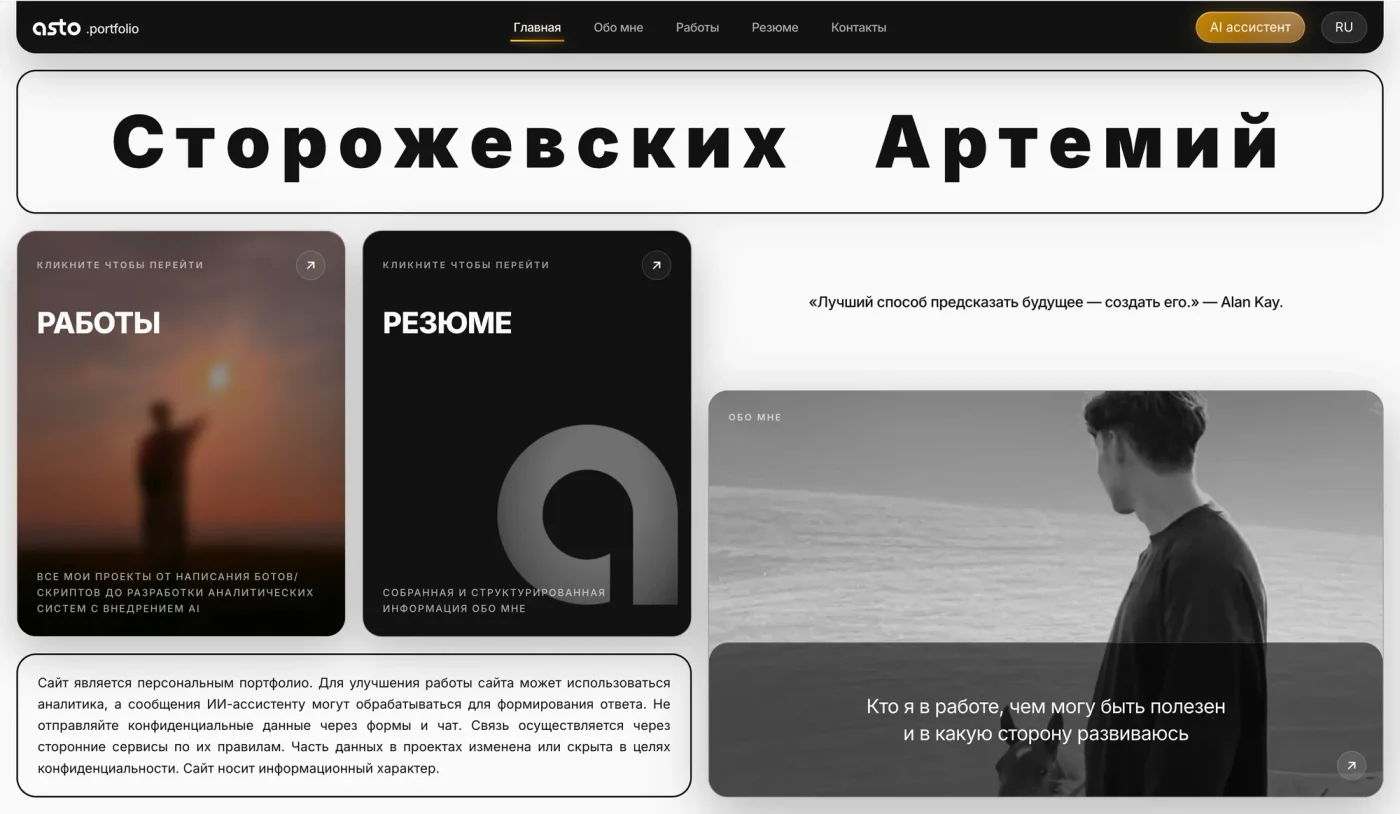
Slide 1 of 12
DESCRIPTION
Full-stack web application built on Next.js 16 (App Router) and React 19 using TypeScript. Rendering is done with server components (RSC), all data changes occur through server actions, and the build process uses Turbopack. The project idea: the site is not a static layout but a database-driven system where every text, image, work, and section can be modified through the admin panel, while public pages and the AI-assistant pull data from a single source of truth — PostgreSQL.
Architecture and data layer
The database is PostgreSQL, accessed via postgres-js and Drizzle ORM; the entire schema is in a separate database namespace (future_face) and consists of about twenty-five tables. Content is divided into entities: navigation, hero blocks of pages, quotes (with an array of pages where they are displayed), KV texts for the main/about/work/contact/resume sections, a general dictionary of UI texts, image slots for the site, and admin notes. Works are modeled as a root table work_items with dependent tables for tags, 'what was done' / 'how it was done' / 'results', and images — all with foreign keys and cascading deletes. The database connection pool is limited in the number of connections and closes idle ones (max, idle_timeout, max_lifetime) to avoid hitting the server's connection limit.
CMS Admin Panel
The restricted section /admin is a full-fledged control panel: separate screens for texts of each page, works (with image uploads), sections 'about me', resume blocks, contacts, quotes, navigation, gallery, image slots, design, and AI-assistant settings. Content can be edited without a single line of code — this distinguishes the project from a regular static portfolio.
Authentication and backend protection
Access to /admin is secured at the server level: requests are intercepted by Next-proxy (formerly middleware) and check a signed session token — HMAC-SHA256 over httpOnly-cookie, implemented using the Web Crypto API, so the module works equally well in both edge runtime proxy and Node. Passwords are verified in constant time (both values are hashed + timing-safe comparison), and the token has a lifespan. Additionally, every server action that modifies data calls requireAdmin() as the first line — this is real protection against mutations, not just redirects for unauthorized users.
Bilingual support (RU/EN)
Implemented at the data level, without i18n libraries: the language is stored in a cookie, KV values are translated with the key suffix __en, and table entities have parallel columns *_en. The final dictionary is assembled by overlaying translations from the UI texts table over the static dictionary in the code, so any text can be overridden from the database. The language of the AI-assistant's response is automatically determined by the user's input text (with a fallback to the site's language).
Media (Cloudinary)
Uploads are done via server-side streaming upload (image/video/raw, in chunks), and delivery is through derived URLs with transformations: auto-format and auto-quality, resizing by width/height, blurred LQIP placeholders (w_32 + e_blur) for instant display before the original loads, poster and clear preview frame for videos, conversion of heavy source files (.mov/.avi, etc.) to .mp4. Deletion from the cloud is done using the saved cloudinary_id.
AI Assistant, Text
Operates on top of OpenAI Chat Completions with a function-calling cycle: the model can invoke web searches (Tavily) and read pages by link, with a limit on the number of such calls per request. The page reading tool is protected against SSRF — DNS is resolved before the request, and each address is checked against private/service ranges (loopback, private networks, link-local, and cloud metadata 169.254, CGNAT, multicast, analogs in IPv6), redirects are manually bypassed with re-checking each hop, a timeout is set, and the page body is trimmed. A 'dossier' about the owner is injected into the system prompt, collected from the database (sections 'about me', works, resume, contacts) and cached with TTL along with the site map; there are modes (job analysis / tasks / market assessment) with editable instructions from the admin panel. The cost of each request is calculated based on tokens and model rates and recorded in analytics.
AI Assistant, Voice
The voice mode is based on OpenAI Realtime: the server issues an ephemeral client_secret (the key is not exposed), and the model and voice are taken from settings. The assistant is given the tool navigate_to(path) — with user consent, it opens the required page during the call without interrupting the conversation; the path is strictly taken from the site's data. Voice messages are recognized via Whisper. The logic for language selection is written separately: the conversation starts in the site's language and switches to the user's language as soon as they speak.
Access to OpenAI via Proxy
For servers that do not have direct access to OpenAI (geo-blocking), a wrapper over fetch is created: with a specified environment variable, all OpenAI calls (chat, voice, recognition) go through a SOCKS5 proxy (fetch-socks over undici-fetch, bypassing patched global fetch); without the variable — a regular direct request.
Private Analytics
A custom system in the same database, without a cookie banner: the visitor identifier is a daily SHA-256 hash of IP + User-Agent + salt, so personal data is not stored, and the hash changes daily. Event types are limited to a whitelist (views, time on page, messages and calls to the assistant, clicks on contacts, resume downloads, language changes), determined by device (by UA) and country (by proxy headers), and the admin panel is never tracked. Campaign links are implemented: a short address /<code> redirects to the target page and tags events, tracking can be disabled for each link, and an audience can be set (to separate recruiters, friends, and personal visits).
Export to Google Sheets
Analytical summaries are exported to Google Sheets via a service account; the client for the Sheets API is written without third-party dependencies — the service account JWT is signed independently using RS256. Metrics are calculated using aggregating SQL queries (classification of pages by types, sums by events).
Resume and PDF
The resume exists both as a page on the site and as a separate document (/resume-file) with a two-column A4 layout. The resume page shows a 'live' preview of this document in an embedded iframe, the scale of which is recalculated using ResizeObserver and depends only on the width of the container — therefore, when the window height changes, the layout does not 'float'. Downloading the resume in PDF is done by rendering the print version of the page using headless Chrome (considering the language). Additional resume blocks (in the sidebar or main part) are added from the admin panel.
About Me Section
The texts in this section have their own lightweight markup (:quote: — large quote, :stat: — cards with numbers that are grouped in sequence, :tags: — a series of chips, headings, callouts, lists); a separate parser converts it into React components. Sections have human-readable url_slugs for addresses /about/<slug>, and there is a gallery.
Responsive Typography
Layout and sizes are built on CSS container queries and units cqi/cqh/cqw with clamp(): work cards adjust to the width of the card itself (not to viewport breakpoints) — when narrowing, tags are hidden first, then the gallery compresses from three previews to one, and the description is not truncated; in AI-assistant blocks, the font is compressed by the height of the container to ensure the text always fits. Styles are Tailwind CSS v4 with CSS-first configuration (@theme), without a separate config.
End-to-End Solutions
All secrets and external accesses (OpenAI, Cloudinary, Tavily, Google service account, proxy, database, admin password) are extracted from business logic into environment variables; access tokens and heavy queries are cached; analytics event times are normalized; the working directory for Turbopack is explicitly fixed to prevent the bundler from indexing unnecessary files.
TOOLS USED
- TypeScript
- Next.js 16 (App Router
- React Server Components
- Server Actions
- proxy/middleware)
- React 19
- Tailwind CSS v4 (CSS-first @theme)
- tw-animate-css
- PostgreSQL
- postgres-js
- Drizzle ORM
- Drizzle Kit
- Cloudinary
- OpenAI API (Chat Completions
- Realtime
- Whisper)
- Tavily API
- Google Sheets API (сервисный аккаунт
- JWT RS256)
- fetch-socks
- undici
- Web Crypto API (HMAC-SHA256)
- CSS Container Queries (cqi/cqh
- clamp)
- headless Chrome (печать в PDF)
- Turbopack
- ESLint
- Git
RESULT
- Designed and implemented a PostgreSQL schema with ~25 tables in a separate namespace, with foreign keys and cascading deletes; accessed via Drizzle ORM and a postgres-js pool with connection count and lifetime control.
- Built a custom CMS admin panel: all site content (texts, images, works, sections, contacts, quotes, navigation, assistant settings) is edited from the database without code changes — a single source of truth.
- Implemented server-side authentication on signed HMAC-SHA256 tokens via Web Crypto (works in both edge-proxy and Node), with constant-time password verification and protection for all mutations via requireAdmin().
- Achieved bilingual support RU/EN at the data level (cookie + __en suffix for KV and *_en columns for entities) with overlaying translations from the database over the static dictionary, without i18n libraries; the AI response language is determined automatically.
- Integrated Cloudinary: server-side streaming upload of image/video/raw and delivery via derived URLs (auto-format/quality, resizing, blurred LQIP placeholders, posters, and mp4 conversion for videos).
- Developed a text-based AI-assistant on OpenAI with function-calling: web search (Tavily) and page reading with SSRF protection (DNS check for private ranges and manual redirect bypass); context 'dossier' is collected from the database and cached.
- Implemented voice mode on OpenAI Realtime with ephemeral sessions and a navigate_to tool for site navigation during calls; speech recognition via Whisper.
- Added the ability to route all OpenAI calls through a SOCKS5 proxy (fetch-socks + undici) for servers without direct access, switchable via an environment variable.
- Implemented cost tracking for AI requests based on tokens and model rates with logging in analytics.
- Built a private custom analytics system without a cookie banner: daily hash identifier for visitors, a whitelist of events, time on page, device and country detection, excluding the admin panel from tracking.
- Implemented campaign links: short /<code> redirects to the target page, event tagging, tracking toggle, and audience settings for each link.
- Wrote a Google Sheets API client without dependencies (self-signed JWT using RS256) and exported aggregated analytics to sheets.
- Created a 'live' preview of the resume through a scalable iframe (scale recalculated via ResizeObserver, independent of window height) and exported the resume to PDF via headless Chrome.
- Developed a parser for custom markup in the 'about me' section (:quote:/:stat:/:tags:/headings/callouts/lists) with rendering into components.
- Implemented fluid typography and responsive layout using CSS container queries and units cqi/cqh with clamp() — fitting to the container with priority given to hiding secondary elements instead of truncation.
- Extracted all secrets and external accesses into environment variables; heavy queries and tokens are cached.
AI-ASSISTANT
Ask a question about this project